Git Practices for AI-Assisted Development: Keeping Changes Auditable and Reversible
How to use branches, staged commits, and diffs to stay in control when an AI agent makes dozens of file changes — without slowing down your workflow.
AI coding agents are fast. In the time it takes you to review one file, an autonomous agent might have touched fifteen. That speed is the whole point — and it’s also the reason that disciplined git hygiene matters more when working with AI than when writing code by hand.
Without the right practices, a two-hour AI coding session leaves you with a pile of unstaged changes across a dozen files, no clear record of what was asked versus what was produced, and no easy path back if something went wrong.
The practices below don’t slow down AI-assisted development — they’re what let you move faster with confidence.
Commit before you delegate
The single most effective habit: before you hand a task to an AI agent, commit your current working state. Even a WIP commit works.
git add -p   # review what's staged
git commit -m "WIP: before AI refactors auth middleware"
This does three things. It creates a clean checkpoint you can git reset --hard to if the session goes sideways. It gives you a clear git diff HEAD that shows exactly what the AI produced, separate from anything you wrote. And it means that if you stash the wrong thing or accidentally discard changes, you have a recovery point.
The “before” commit costs thirty seconds. Not having it can cost an hour of untangling.
One branch per substantial AI task
For anything that will produce more than a handful of changes, use a dedicated branch.
git checkout -b ai/refactor-user-authThe discipline is: this branch contains only what the AI was asked to do. You don’t add your own incidental fixes to it, and you don’t ask the AI to do two different things on the same branch.
This makes reviewing the PR later much cleaner — the diff is exactly one task, not a mix of AI changes and your own opportunistic cleanup. It also makes selective reversion straightforward: if the AI’s refactor broke something subtle, you can close the branch without losing anything you wrote yourself.
If you’re doing many AI tasks in sequence, the pattern is:
- Branch from
main(or your base branch). - AI does the task.
- You review the diff, fix anything off, and commit.
- Merge and delete the branch.
- Next task gets its own branch.
It sounds like overhead but each step is fast, and the audit trail it creates is worth the discipline.
Use git diff before every commit
AI agents are good at following instructions and bad at knowing when to stop. A well-scoped task prompt produces a clean diff. A slightly underspecified one can produce a diff that includes “helpful” changes adjacent to the ones you asked for: reformatted blocks, renamed variables, extra blank lines removed.
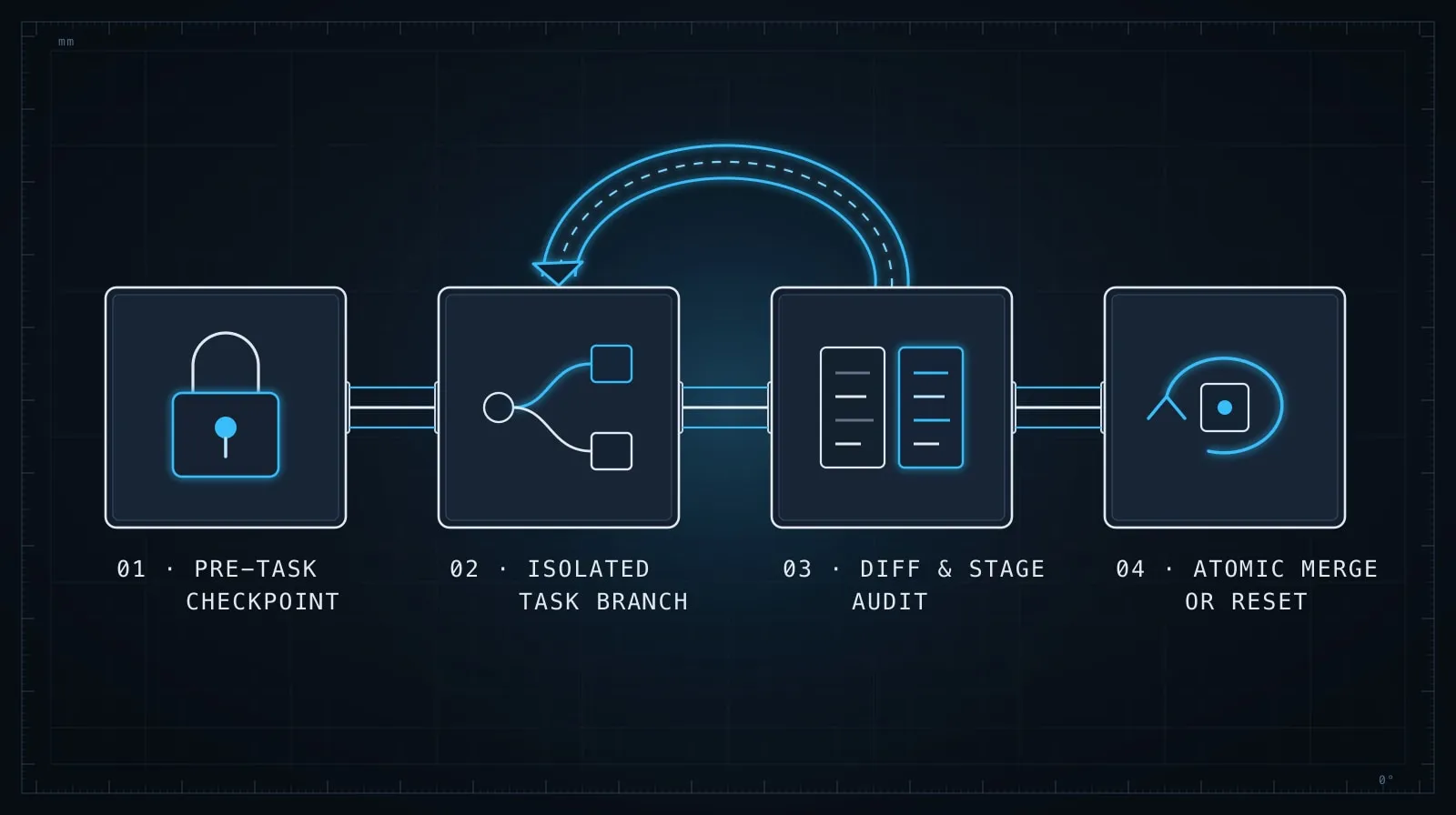
Before you commit any AI-generated code, run:
git diffor, if you’ve already staged:
git diff --stagedRead it. The question isn’t whether the code compiles — it’s whether the diff matches your mental model of what you asked. Look specifically for:
- Files you didn’t expect to be modified. An agent asked to update one route shouldn’t have touched a utility file three directories away.
- Deletions that look like accidents. A missing import that worked before, a comment that documented a non-obvious constraint.
- Changes beyond scope. Formatting a whole file when you asked for one function change.
When you find something unexpected, use git checkout -- <file> or git restore <file> to discard changes to that specific file before committing. This is easier than reverting after the fact, and it keeps your commit honest.
# Unstage and discard AI changes to a file you didn't intend to modify
git restore src/lib/utils.ts
Commit in small, coherent units
Resist the habit of letting changes accumulate across an entire session and then committing everything at once with git add .. When you review the commit three days later — or when something is broken and you’re git bisect-ing — a single commit called “AI session” is nearly useless.
Instead, commit at natural checkpoints within the session:
- After the schema is done and verified.
- After the data layer is written and the types check.
- After the routes are added and the build passes.
# Selective staging — only the files from this step
git add src/db/schema.ts src/db/migrations/0004_user_settings.sql
git commit -m "Add UserSettings schema and migration"

git add src/lib/settings.ts
git commit -m "Add getSettings/updateSettings data layer"
This is the same decomposition logic from Task Decomposition for AI Coding Agents applied to your git history. Each commit maps to one verifiable step. If the data layer commit introduces a bug, you can revert exactly it without touching the schema.
The stash pattern for experiments
When you’re not sure whether an AI approach will work, use a branch or stash rather than overwriting your current state.
# Save your current work, try the AI's approach on a clean slate
git stash push -u -m "before trying AI's caching approach"
# ... run the AI session ...
# If it didn't work:
git stash pop
# If it worked, commit the new state and drop the stash:
git stash drop
This makes “let’s try this differently” zero-cost. You’re not deciding between the old approach and the new one up front — you’re just making it easy to get back to either one.
The -u flag includes untracked files, which matters when the AI creates new files as part of the approach you’re experimenting with.
Annotate AI commits in the message
It doesn’t need to be elaborate, but a commit message that says where the change came from is useful context six months later.
A clear format:
Add null-safety guards to user profile route

AI-generated: prompted to handle the case where session.user is undefined
before accessing profile fields. Reviewed and tested manually.
The key line is the middle one: what was prompted. Not a transcript of the conversation — just what the intent was. When you’re reading this commit to understand a bug, knowing “this was AI output from a specific prompt” is different from knowing “a human wrote this as part of a focused refactor.”
This is lightweight and takes ten seconds. It’s not about auditing the AI — it’s about giving your future self context that the diff alone doesn’t carry.
Squashing before merge vs. preserving granularity
When an AI task produces several small commits — the schema, the data layer, the routes — you have a choice: squash them into one commit when merging to main, or preserve the history.
Preserve the history when the sequence of steps is informative. If someone is learning the codebase, seeing schema → data layer → routes as separate commits tells a clear story.
Squash when the intermediate commits are noise. If you committed at every “AI fixed a type error” step, that history is clutter. Squash to one commit per logical change.
# Interactive rebase to squash the AI's six "fix type error" commits into one
git rebase -i HEAD~6
There’s no universal rule here. The question is whether the intermediate history will be useful to someone reading it later. If the steps tell a story, keep them. If they’re debugging artifacts, squash them.
Recovery: getting back to a known state
When an AI session produces something deeply wrong — not one fixable file, but a tangle of changes you can’t cleanly untangle — git reset is your friend.
# Discard all AI changes, go back to the commit before the session
git reset --hard HEAD~1     # if you committed one "before" commit
git reset --hard <sha>      # if you have the specific SHA
This is only clean if you committed before the session — which is exactly why the first practice matters. Without that checkpoint commit, you’re manually undoing changes file by file.
For surgical removal of one file’s changes:
git checkout HEAD -- src/routes/users.ts # restore one file to the commit stateFor reverting a specific commit that’s already been pushed:
git revert <sha> # creates a new "undo" commit, preserves historyPrefer git revert over git reset --hard on anything that’s been pushed to a shared branch — it adds an undo commit rather than rewriting history.
Git as a review mechanism
The underlying principle is that git is not just version control — it’s the mechanism by which you review what AI produced before it becomes permanent. git diff is your pre-commit review. A clean branch is your scope boundary. A descriptive commit is your future explanation.
This connects directly to the point in Evaluating AI-Generated Code Before It Ships: the review step is yours. The AI produces a candidate; you decide what actually goes in. Git is the layer where that decision is made tangible.
The developers who get consistently good results from AI agents share one habit: they treat AI changes with the same git discipline they’d apply to a PR from a fast, junior contributor. Review the diff, commit deliberately, and always have a clean rollback path. The speed of AI generation is a feature only when the review step is sound.